How to write a clear subject line?
Your subject line decides whether your follow-up gets opened or ignored.
Keep it short, relevant, and personalized; ideally under 40 characters.
A few examples that work well for follow-ups:
- Still interested in [specific topic]?
- Quick question about [prospect’s company]
- Following up on our chat about [pain point]
- Thought you’d find this useful, [First Name]
What to avoid:
- Overly pushy lines like “Didn’t get a reply to my last message!”
- Spam triggers such as “Act now!!!” or “Free $$$”
- Generic lines like “Checking in” (it doesn’t add context or value)
A strong subject line signals relevance and professionalism while sparking curiosity.
Pairing it with personalization (like a reference to your earlier email) shows you’re paying attention, not blasting out a template.
What tone should you use?
Keep it polite and professional, but with enough warmth to feel human. Nobody likes reading an email that feels like a demand.
A conversational, helpful tone works best.
Frame your message around solving a problem or offering value, rather than pointing out they haven’t replied.
Adjust the formality to fit the situation:
- Existing rapport: lighter and more casual
- New or senior contact: professional but approachable
- Different industries: mirror the tone prospects use in their own communication
The goal: remind, don’t pressure. You’re making it easy for them to respond, not guilt tripping them for not responding sooner!
How to open your follow-up email?
Start by briefly referencing your previous message, so the prospect can instantly place you without scrolling. Be specific, but keep it light. For example:
- “I reached out last week about helping [Company] streamline [X process]…”
- “Circling back on the note I sent about [specific pain point]…”
Next, add any relevant context to jog their memory or build rapport.
- “Saw you recently raised your Series A, congrats!”
- “Noticed your post on [topic]. Completely agree with your point on [X]…”
- “[Mutual contact] suggested I reach out, and I wanted to follow up…”
Keep it short, sharp, and relevant.
The best openers answer the silent question in your prospect’s mind: “Why are you emailing me again?”
Do:
- Remind them of the “why”
- Lead with a helpful, relevant hook
- Make it feel like a continuation
Don’t:
- Start with “Just checking in”
- Re-explain your entire offer
- Open with “Hope this finds you well”
What should the main message include?
The body of your follow-up is where you bring the value back into focus.
If your opener is the reminder, this part answers the question: “Why should I care now?”
Here’s how to make it count:
1. Reframe the value
Instead of repeating your original pitch word for word, distill the benefit in simpler terms.
Focus on what changes for the prospect if they take the next step.
Try something like:
- “We help B2B sales teams speed up outreach by automating follow-ups like this one.”
- “If your team is spending hours manually [task], we might be able to cut that down to minutes.”
Make it specific. Avoid phrases like “We improve efficiency”. Tell them how.
2. Address hesitation upfront
Think about what might be holding them back: budget? timing? effort required?
Tackle it gently to lower friction:
- “If this isn’t a priority right now, happy to reconnect down the line.”
- “This only takes a few minutes to explore. No commitment needed!”
3. Keep the message lean and easy to scan
Break your message into 2-3 short paragraphs, or use bullets if you’re listing benefits.
For example:
“What you’d get from a 15-minute call:
- A quick demo tailored to your current workflow
- A sense of whether this fits your goals
- Zero pressure to move forward”
4. Focus on one clear idea
This isn’t the time to list every feature or benefit. Stick to one clear value point tied to your CTA.
Leave the rest for future emails or the actual conversation.
How to add a clear call to action (CTA)?
If your follow-up ends with a vague “Let me know what you think,” don’t be surprised when no one replies.
A strong CTA removes guesswork.
It tells the prospect exactly what to do next, makes it easy to respond, and moves the conversation forward without sounding pushy.
1. Choose one clear next step
Give your prospect one job, not three.
The more options you throw in, the less likely they are to pick one.
Examples of strong CTAs:
- “Would you be open to a 15-minute call next week to explore this?”
- “If this looks interesting, feel free to grab a slot here: [Calendly link]”
- “Should I send over a quick walkthrough video?”
Avoid “just checking in” or “any thoughts?”
They don’t tell the reader what you’re actually asking for.
2. Match the CTA to the stage
Not every follow-up needs to ask for a meeting.
Choose the right level of ask based on how warm the lead is:
| Context |
Good CTA |
| Cold outreach |
“Happy to send a short overview if you’re interested.” |
| Mild interest |
“Would a quick call make sense to explore this further?” |
| Post-demo |
“Let me know if you’d like to move forward or need more info.” |
3. Make it ridiculously easy to respond
Reduce friction wherever you can:
- Use direct links to book a call
- Phrase your ask as a yes/no question
- Keep it casual and easy to reply in under 10 seconds
Example:
- “Can I send a short summary you can review on your own time?”
- “Would it help if I pulled a few examples tailored to your team?”
How to use personalization effectively?
Personalized subject lines boost response rate by 30.5%, and emails with personalized message bodies have a 32.7% better response rate than those that don’t personalize their messages.
Here’s how to personalize in a way that works:
1. Use specific, timely details
Start with the basics: name, company, and role.
But don’t stop there. Look for something current that ties into why you’re reaching out.
Examples:
- “Saw [Company] just rolled out a new onboarding flow. Congrats!”
- “Noticed your team is hiring for [role]. Bet things are moving fast over there.”
- “Read your post on improving demo-to-close rates. Smart take on qualification!”
Don’t force it. If there’s nothing personal to use, shift the focus to their industry or job function.
2. Reference your last touchpoint
If this isn’t your first email (which it isn’t), acknowledge that.
Even a quick line shows you’re tracking the conversation and not just spraying follow-up templates.
Examples:
- “Just following up on the note I sent last week about helping [Company] speed up outbound.”
- “Last time I reached out, I mentioned [specific benefit]. Curious if that’s still relevant.”
3. Use tools like Reply.io to scale personalization without sounding like a robot
AI can help you personalize smarter, but only if the data points actually connect to your message.
Jason AI SDR (Reply’s AI sales agent) can pull in firmographics, job titles, tech stack, and recent activity so you can tailor messaging fast and still keep it human.
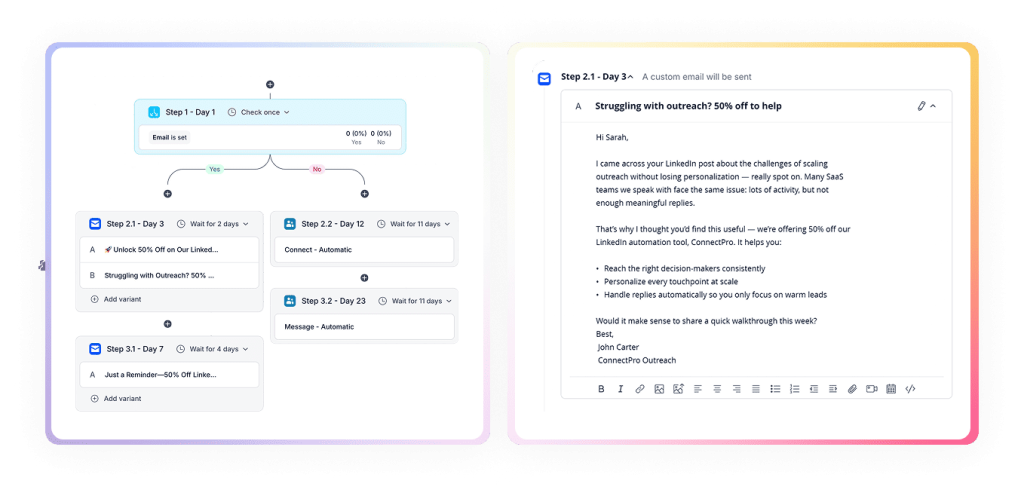
For example: “Looks like you’re using [CRM]. We integrate directly, so setup is simple.”
Your goal is to show relevance and spark interest.
Let’s be honest…following up takes time.
Writing a fresh message, figuring out the right gap, making sure it actually lands in the inbox: it’s a lot to juggle when you’ve got dozens of prospects in the picture.
That’s where AI can give you an edge.
With tools like Jason AI SDR, you get smart suggestions for what to say, automated sequences that keep you consistent, and delivery optimizations that make sure your emails show up at the right time.
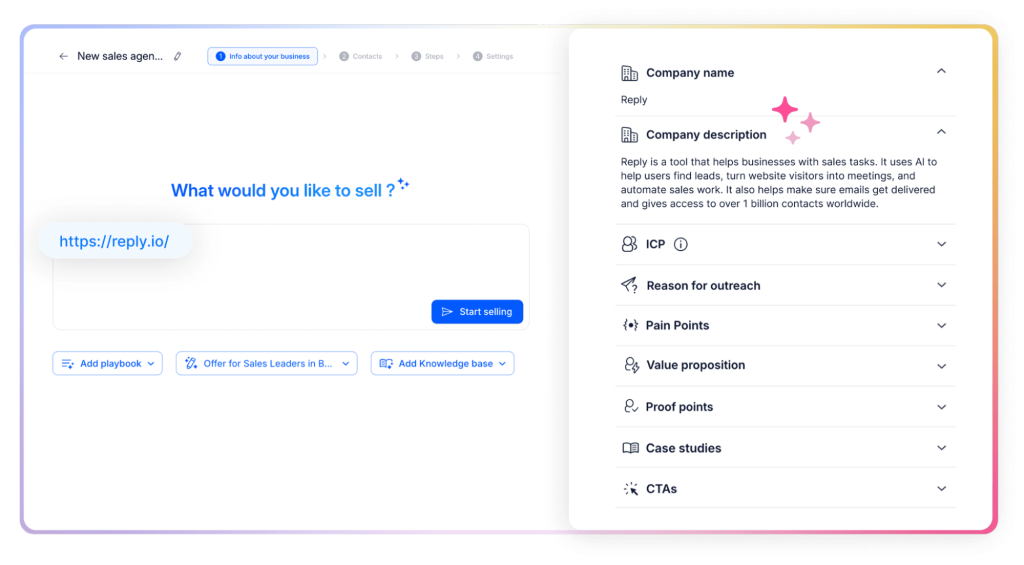
1. AI-powered writing with context
Jason AI studies your offer, playbooks, buyer persona, and past communications to generate outreach that feels human and relevant.
It also takes into account firmographics, recent web signals, social media cues, and company context.
So instead of tweaking a stale template, you get a smart follow-up draft that reflects your voice.
2. Automated, adaptive sequences
You don’t need to micromanage follow-ups. Jason AI helps you design multichannel sequences (email, LinkedIn, calls) that run on autopilot.
It can even continuously insert new leads matching your ICP into open sequences (evergreen mode).
Because it tracks what works and adapts accordingly, your outreach stays consistent without sounding robotic.
3. Smarter timing, deliverability, and response handling
Getting your message into the inbox at the right moment makes all the difference.
Jason AI optimizes follow-up send windows, rotates inboxes to avoid deliverability patterns, and tracks engagement to push follow-ups when they’re most likely to land.
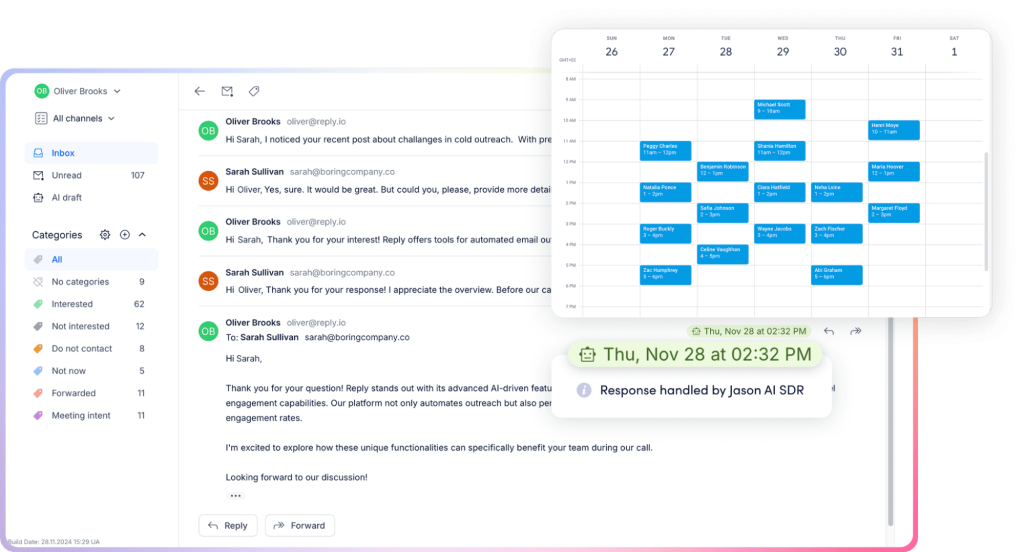
And when someone replies?
Jason can generate reply drafts (Copilot mode) or send auto-responses (Autopilot), intelligently distinguishing meeting asks, reschedules, or “not now” replies.




![The Ultimate Email Deliverability Toolset for 2026 [15+ Tools]](https://test.reply.io/wp-content/uploads/deliverability-300x158.jpg "The Ultimate Email Deliverability Toolset for 2026 [15+ Tools]")