Managing outreach should feel easy, not like hunting through a cluttered inbox jungle. But if you’ve ever asked yourself, “Wait, which account was for APAC cold leads, and which was for Q3 follow-ups?”…you’re not alone.
It’s time to ditch the guesswork.
Introducing Email Account Tags—a simple but powerful new way to bring order to your email chaos. You can now create custom tags for each of your email accounts. Think of them like smart labels for your outreach.
Flexible, searchable, and super easy to use.
Here’s how to create your tags: Go to Settings, then Email Accounts. Choose one or several email accounts, and then select Assign to tag.
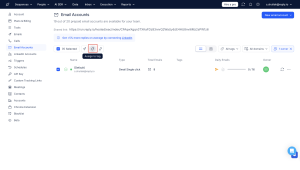
Need an account to be part of both “Client X” and “High Deliverability” groups? No problem. Email accounts are allowed to have multiple tags. No limits, no confusion.
It’s a small change, but it completely transforms how you organize, manage, and scale your campaigns.
What can you do with tags?
Let’s break it down with a few practical ways tags save you time and stress:
1. Quickly find the right accounts
Instead of scrolling through a massive list, just filter by tag.
Launching a new campaign for the APAC region? Type in “APAC Lead Gen” and all relevant accounts are right there. No clicks wasted.
2. Make bulk changes in seconds
Need to pause emails from a specific segment? Done.
For instance, your legal team needs to pause EU outreach due to a new GDPR update. Select the “EU Market” tag, hit pause. Problem solved.
3. Instantly track down accounts
Ever find yourself wondering, “Who is ‘John from Acme Corp’?” Tags make it simple. You can now tag each account with the name of the person responsible for it, saving you valuable time otherwise spent figuring out whose account is whose.
4. Get better insights with segmented analytics
Now, you can easily compare the performance of different email accounts by filtering them using tags. Instead of manually selecting individual mailboxes, simply use tags to group and analyze accounts by segment, team, or strategy. This allows you to quickly identify what’s working, pinpoint issues, and make smarter decisions based on accurate, targeted insights.
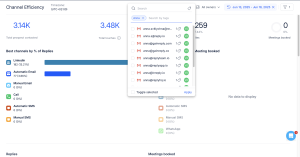
Why does it matter? Tags aren’t just about tidying up.
They’re about giving you more control, more clarity, and more time to focus on what works.
- Stop guessing.
- Stop digging.
- Start scaling, smartly.
No matter if you’re running multiple campaigns, juggling a team of SDRs, or keeping compliance in check, tags help everything run smoother.



![The Ultimate Email Deliverability Toolset for 2026 [15+ Tools]](https://test.reply.io/wp-content/uploads/deliverability-300x158.jpg "The Ultimate Email Deliverability Toolset for 2026 [15+ Tools]")