Stand out in inboxes with LinkedIn AI voice messages
Most emails and texts get ignored. They blend in with the hundreds of other messages flooding inboxes every day. LinkedIn voice messages are different. They sound human. They’re casual. They make people pause to listen. That’s where real conversations begin.
You’ve probably tried LinkedIn voice messages in Reply before. But here’s what’s new: AI Voice Messages let you automatically create personalized voice messages at scale, in your own voice, across 30+ languages, without you recording a single one.
Before, you recorded one voice message and sent it to everyone. Useful, but still generic.
Now? One template becomes thousands of unique messages. Your real voice (recorded once) combines with AI personalization (name, company, job title, achievements from their LinkedIn profile). The result: personal-sounding voice messages that feel like you reached out individually to each prospect.
Instead of “Hey, interested in learning about our product?” a prospect gets “Hey Sarah, I saw your company just raised Series B – congrats! I’ve helped similar companies in the logistics space reduce implementation time by 60%. Thought you might find it interesting.”
Same voice. Completely different message. Done automatically.
Wanna know how to set it up?
Step 1: Create your Voice Profile
- Go to Settings → Voices
- Record or upload a voice sample (just 1–2 sentences)
- Save it as your profile
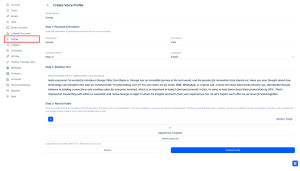
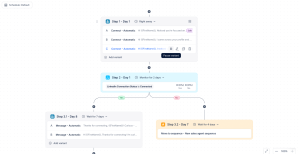
Step 2: Add a voice step to your sequence
- Click “Add step”
- Select “LinkedIn AI Voice Message”
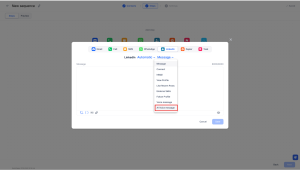
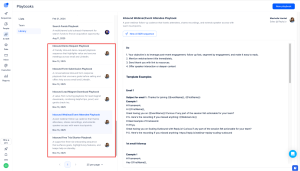
Step 3: Write your template with variables
- Write a base message: “Hey [first_name], saw your recent [ai_latest_achievement]…”
- Use variables for names, companies, titles
- Use AI variables to pull data from their LinkedIn profile automatically
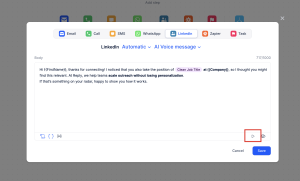
Step 4: Preview, edit, and launch
- Listen to how it sounds
- Edit if needed
- Launch to your prospects
Done. Unlimited personalized voice messages in your own voice, done automatically.
What’s more, voice replies from LinkedIn now land directly in your Reply inbox alongside your emails and other messages. No need to switch platforms. You’ll never miss a conversation.
If you want Jason AI SDR to do the heavy lifting, it can.
Jason can automatically write your voice templates using each prospect’s LinkedIn posts, company info, and achievements. You don’t even write the template – Jason does. You just record your voice once, and Jason generates completely personalized messages for thousands of prospects.
Book a demo to see Jason writing personalized voice templates in real-time.
Voice messages get higher response rates than text. Personalized messages get higher response rates than generic. Combine them and you get replies your competitors are dreaming of. And you’re doing it at scale without burning out.





![The Ultimate Email Deliverability Toolset for 2026 [15+ Tools]](https://test.reply.io/wp-content/uploads/deliverability-300x158.jpg "The Ultimate Email Deliverability Toolset for 2026 [15+ Tools]")