Integration Agent
Oneshot’s Integration Agent connects directly with your sales tools to keep data in sync. It retrieves prospect details from CRMs like HubSpot and platforms like Apollo, Outreach, and Salesloft.
The Integration Agent helps further personalize outreach, avoid duplicate work, and ensure that messages align with what’s already known about the prospect.
It also logs activity back into your CRM, enabling users to automatically maintain up-to-date lead information.
Persona Agent
Oneshot AI Persona Agent segments and personalizes outreach based on the prospect’s points and processes.
It can, for instance, create segments such as demand-gen marketers looking to increase pipeline efficiency, or sales enablement managers trying to improve rep onboarding.
With hyper-targeted segments like these, SDRs can be sure that their messaging speaks to the specific challenges of each persona and, therefore, increases the chances of engagement and response.
Scaling Agent
The Scaling Agent allows outreach that changes based on the prospect’s buying stage. It changes the messaging based on whether a lead is cold, warm, or engaged.
Cold leads receive messages geared toward building trust and addressing common industry pain points. Warm leads, on the other hand, get more targeted messaging, offering specific solutions and implementation details. Meanwhile, engaged leads see detailed ROI messaging and value tailored to particular stakeholders.
The Scaling Agent also personalizes communication for each person involved in the deal, enabling SDRs to run relevant multi-touch campaigns throughout the buying process.
Prompt library & templates
OneShot leans heavily on its prompt library, giving its users a set of pre-built templates to generate effective cold emails without having to start from scratch. You pick a prompt, feed it some basic info, and OneShot turns it into an email or LinkedIn message in a certain tone or style. It’s a quick way to get copy out the door, especially if you don’t have a strong messaging foundation or don’t want your team writing everything manually.
The limit here is that most of the “heavy lifting” still depends on how good the starting prompt is. If your input is too generic, the output tends to feel the same. With Jason AI, you don’t need to rely on templates because the system builds tailored, data-driven messaging around your offer, ICP, and target audience — leading to more relevant outreach without prompt-hunting.
LinkedIn touchpoints
OneShot isn’t only about email drafting — it also helps you create LinkedIn content and touchpoints to support your outreach. The idea is to give SDRs and founders a way to stay active on LinkedIn without spending hours coming up with post ideas or custom comments. You can generate short posts, comment ideas, and quick touches that help keep prospects warm or visible before you reach out. For smaller teams that don’t have an established personal branding engine, this can be a handy add-on.
That said, it’s more of a “content helper” than a full LinkedIn automation engine. If LinkedIn is part of your lead generation strategy, keep in mind that there are numerous Oneshot AI alternatives that have much more impressive automation features.
Jason AI, for instance, automates LinkedIn connection requests and crafts personalized messages as part of a more cohesive multichannel outreach sequence. This way, the moment Jason AI sends the initial cold email, he will then automatically send a LinkedIn connection request in a day or two to keep you fresh in mind of your prospects.
What are the Oneshot AI pricing plans?
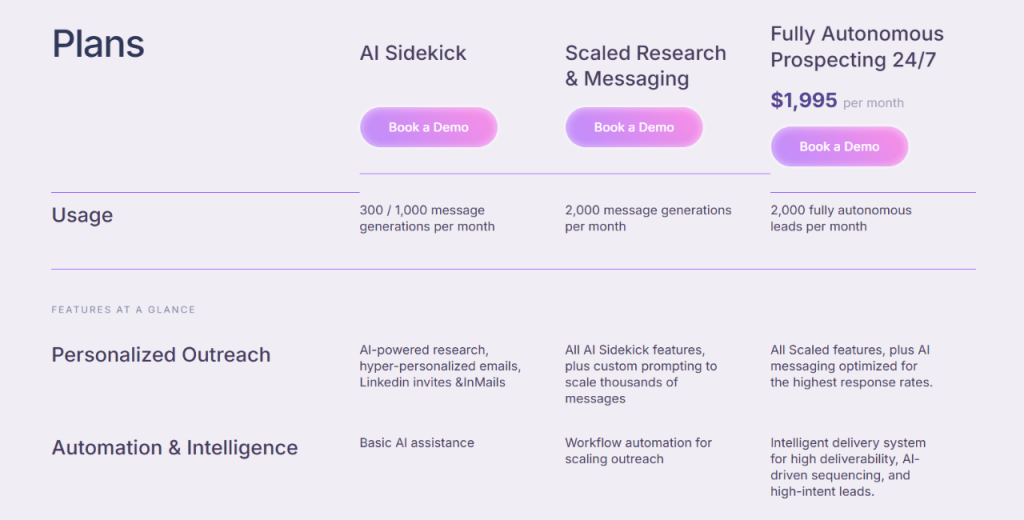
Oneshot AI pricing is structured in three tiers as follows:
1. AI sidekick → Book a demo for pricing
AI Sidekick is Oneshot’s entry-level plan, optimized for personalized, one-on-one outreach.
It includes features like AI-powered research, hyper-personalized emails, and LinkedIn invites and InMails.
You also get 300–1,000 message generations per month, supported by basic AI assistance. In addition, LinkedIn, HubSpot, Apollo, Salesloft, and Outreach integration come as a standard.
According to Oneshot, AI Sidekick works best for individual outreach and 1:1 personalized messaging.
2. Scaled research and messaging → Book a demo for pricing
Scaled Research and Messaging is Oneshot’s mid-tier plan for SDRs sending outreach at higher volumes.
It comes with all AI Sidekick features and custom prompting. Scaled and Research offers 2,000 message generations per month and workflow automation.
The package includes LinkedIn, HubSpot, Apollo, Salesloft, and Outreach as a standard.
3. Fully Autonomous Prospecting → $1,995 per month
Fully Autonomous Prospecting is Oneshot’s top-tier plan.
It offers all Scaled features and AI-optimized messaging.
In addition, the plan comes with 2,000 fully autonomous leads per month, powered by an intelligent delivery system, AI-driven sequencing, and high-intent lead targeting.
Fully Autonomous Prospecting is ideal for high-scale outreach. It allows you access to 400M contacts and advanced analytics.
The plan includes LinkedIn, HubSpot, Apollo, Salesloft, and Outreach as a standard.
Oneshot AI pricing: final takeaway
Since the entry and mid-tier plans sit behind a “book a demo” wall, it’s worth going into the call with a clear idea of what you need. Some people use Oneshot purely as a writing assistant, while others want it to support research and outbound workflows — and that difference impacts what you’ll be quoted.
If you prefer tools with upfront pricing and an easier way to test the waters before committing, Jason AI is more transparent, but if you’re specifically after an AI writing layer for email + LinkedIn, Oneshot can still be a solid fit.
What are Oneshot AI reviews by real users?
To get a better sense of how Oneshot AI fits into real workflows, it helps to hear from people who’ve actually used it. These are everyday users sharing their experience — what works well, what could be better, and how it’s showing up in their day-to-day tasks.
Positive Oneshot AI review examples
One of the first things people mention is the time savings. Prospecting — which usually takes several minutes per lead — gets compressed into a few seconds. As Greg M. puts it, “It takes 30 seconds vs 5–8 minutes per prospect.” That kind of shift doesn’t just save time — it changes how much you can get done in a single day.
Others notice a ripple effect: less time spent on prep means more time for actual selling. One user wrote, “This really gives me back an hour or so a day, giving me more time for cold calling.” That’s a practical outcome — not just a nice-to-have.
Digging deeper, people also talk about how Oneshot helps uncover useful context about prospects. Instead of jumping between tabs or piecing together info manually, the tool pulls everything together in one place. Ben F. noted, “It quickly returns a wealth of information on prospects,” which makes it easier to write messages that actually connect.
Ease of use comes up a lot too. Getting started doesn’t seem to require much setup. Gina Y. shared that “Getting it up and running took a few clicks… super straightforward to use.” That’s helpful if you’re not the type who loves digging into complicated tools.
There’s also a lot of appreciation for how the tool fits into existing workflows, especially with LinkedIn. One user said, “The extension works really well with our Sales Navigator workflow,” which is key if you’re already relying on LinkedIn for outreach.
Negative Oneshot AI review examples
Of course, no tool is perfect. Some people mention that the AI-generated messages sometimes need a little editing to sound more natural. As Ben F. put it, “The AI messaging can feel a bit generic… just needs a few moments to adjust.” That’s not unusual with AI tools — a bit of human touch often makes the final version better.
There are a few technical notes, too. Some users experienced syncing issues with certain CRMs. One reviewer mentioned, “The integration with certain systems could be smoother.” It’s not a deal-breaker, but it’s something to keep in mind if your setup depends on tight integration.
Others wanted more flexibility when editing or creating prompts. Matthew A. wrote, “Would like to see more prompting abilities,” which suggests there’s room to expand customization options. And when it comes to onboarding, a couple of users said it can feel a bit too reliant on AI support. One mentioned that “Back and forth with the AI Prompt Engineer can make onboarding a little difficult.”
What are the best Oneshot AI alternatives?
Although Oneshot AI is a solid tool, it has drawbacks and is, therefore, not perfect for everyone.
Some reasons to consider an Oneshot.ai alternative include:
- You want an AI SDR whose message output doesn’t sound overly generic.
- You prefer a service with upfront pricing to plan your budget better.
- You want a tool that offers more 3rd party integrations
- You’d rather set things up in one go without back-and-forth support.
- You’re looking for a Oneshot.ai alternative that supports bulk LinkedIn outreach.
With that in mind, here’s a rundown of top alternatives to Oneshot AI.
In a hurry? Here’s a quick comparison table.
|
Regie.ai |
Jason AI SDR (Best value) |
Luna.ai |
| Lead database access |
Lead sourcing via integrations |
1B + real-time contacts with intent data |
275 M+ verified contacts with filters |
| Personalization |
ABM-style, lead quality–based targeting |
Multilingual, natural tone, customizable inputs |
ORBIT engine scrapes web and social for copy |
| Multichannel outreach |
Email, calls, social |
Email, LinkedIn, cold calls |
Email |
| Reply automation |
Partial, some follow-ups guided by AI |
Yes, with Autopilot and Copilot |
❌ |
| Meeting booking |
❌ |
Yes, auto-scheduling built-in |
❌ |
| Buying-stage awareness |
Some persona-driven engagement |
Evergreen sequences auto-adjust by engagement |
❌ |
| Email infrastructure |
Limited to platform-level warmup and IP setup |
Built-in warmup, dedicated IPs, spam protection |
Fully managed, auto-warmup, and deliverability |
| CRM and calendar integration |
CRM sync, no calendar booking |
Full CRM and calendar sync with conflict checking |
CRM sync, no calendar support |
| Pricing |
Starts at $35,000/year + $150/rep/month |
$300–$10,000/month (public plans) |
Not publicly listed |
| Best for |
Users looking to replace multiple sales tools |
Business looking for full-funnel AI SDR with high ROI |
SMBs prioritizing lead data and email copy |
|
|
Book a demo
|
|
Jason AI SDR




![The Ultimate Email Deliverability Toolset for 2026 [15+ Tools]](https://test.reply.io/wp-content/uploads/deliverability-300x158.jpg "The Ultimate Email Deliverability Toolset for 2026 [15+ Tools]")