Custom Calendar for complete control over your sequence timing
Ever sent a follow-up email on a national holiday? Or scheduled LinkedIn messages while you’re at a conference and can’t respond? Those mistimed touchpoints can hurt your reply rates and waste valuable opportunities.
Custom Calendars solve this by giving you complete control over when your sequences send messages. Whether you’re observing regional holidays, taking time off, attending events, or simply working a non-standard schedule, you can now ensure your outreach only goes out when you’re available to engage with responses.
Ready-made calendars for Australia, France, Canada, Germany, United Kingdom, and the United States are still available, but Custom Calendars let you build a schedule that matches your exact availability—because the best outreach is the kind you can actually follow up on.
How to add a Custom Calendar:
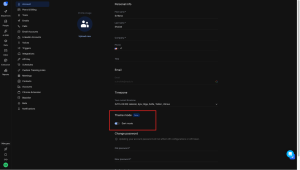
- Go to Settings → Schedule → New schedule
- In Advanced Settings, enable Skip public holidays
- Tap the dropdown to create your own calendar
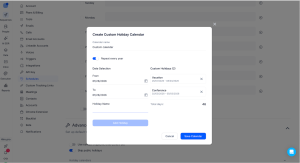
Your sequences will automatically skip the dates you’ve marked, keeping every touchpoint timely and professional.



![The Ultimate Email Deliverability Toolset for 2026 [15+ Tools]](https://test.reply.io/wp-content/uploads/deliverability-300x158.jpg "The Ultimate Email Deliverability Toolset for 2026 [15+ Tools]")