Sculptor
Sculptor lets you build GTM workflows using natural language instead of manually writing formulas or complex logic. You can describe what you want Clay to do, such as “finding companies that raised Series B, hired a VP of Sales, and recently visited your pricing page”, and Sculptor will help you do exactly that.
It does this by tying together data enrichment, signal detection, and prospect qualification into a single workflow. So rather than doing multiple of these actions separately and with manual handoffs, Sculptor will run these workflows inside Clay.
Claybooks
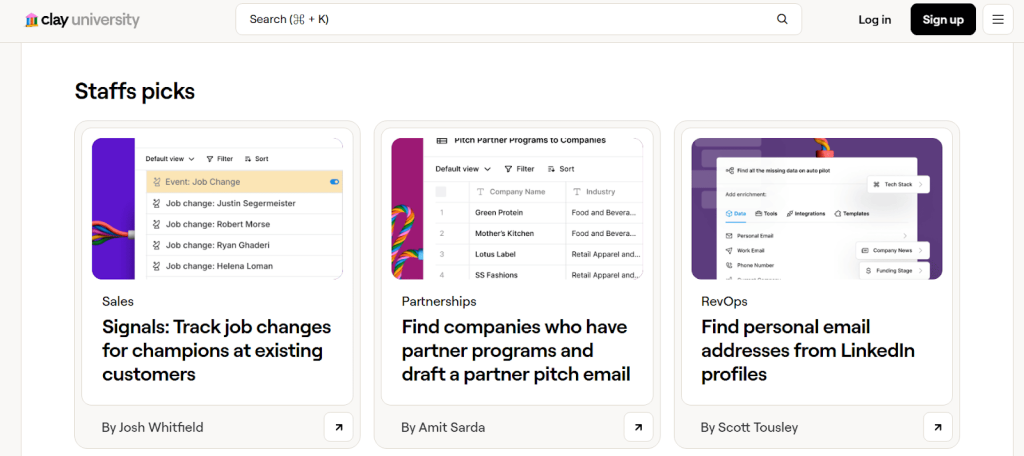
You don’t have to create and run GTM workflows from scratch. Claybooks provide pre-built templates, called Claybooks, for common signal-driven workflows, so you don’t have to start from a blank slate.
Each Claybook focuses on a specific GTM use case, such as sourcing accounts using technographic signals, enriching CRM records with intent data, or triggering outreach when multiple contacts at an account show high-intent signals.
Source: Clay University
So instead of guessing which signals to include in account scoring or how to structure a re-engagement workflow, you’re starting from a framework that’s already been thought through.
AI Formula
AI formulas let you build custom lead scoring and conditional logic inside Clay using only natural language prompts and without writing code.
You can, for example, tell Clay what logic you need, like “only run enrichment for accounts that meet my ICP” or “give higher scores to accounts with both a pricing-page visit and a new VP hire,” and it will come up with the working formulas for you.
So instead of manually building complex formulas to score accounts, filter rows, or decide when a workflow should run, you use AI to generate those formulas for you. Or you might run enrichment only for contacts who already have a valid work email, or only trigger outreach when a lead score exceeds a threshold.
The concept of GTM Alpha
GTM Alpha is the advantage you get when you notice patterns before your competitors or when they miss these patterns entirely.
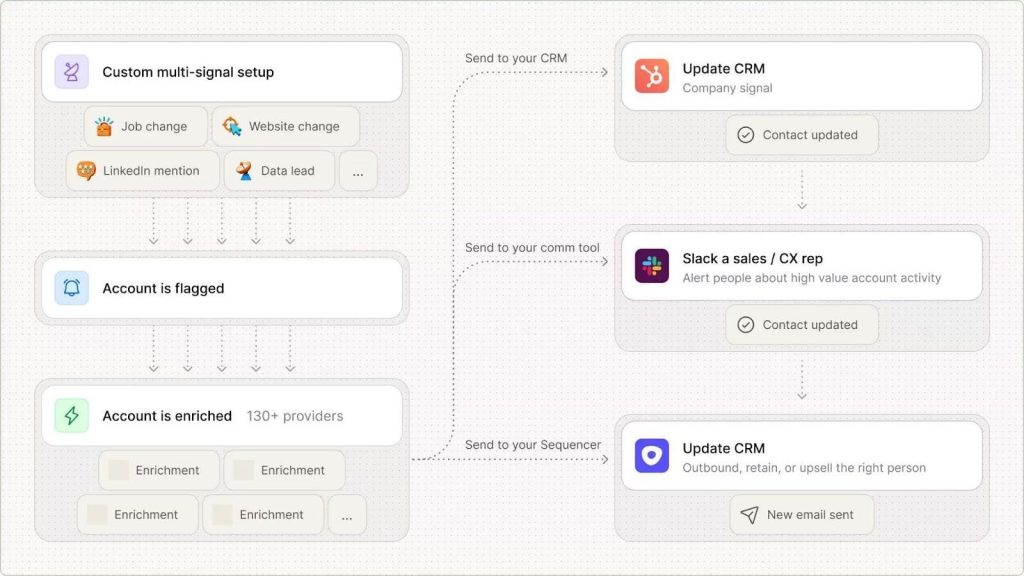
Individual signals like recent hires, fundraising announcements, or tech stack changes are powerful for your GTM motion, but almost all your competitors are using the same signals. But when you layer multiple signals together, this will help you reach GTM Alpha. This will give you an edge over your competitors.
And this is where Clay performs exceptionally well.
It uses its Clayagent to connect your data and find unique insights about prospects. For example, instead of targeting “all SaaS companies in North America” like your competitors, you might use Clay to identify:
- Companies with usage-based pricing models
- That just posted a job opening for a Customer Success Manager
- And have visited your integration documentation multiple times in the past week
Any single signal could be a coincidence, but these three together reveal a company that’s growing its customer base and evaluating tools to support that growth.
That’s GTM Alpha, using connected signals and speed to engage buyers before the opportunity becomes obvious to everyone else.
How Clay tracks and enriches data
Most companies pick one or two data vendors, such as Bombora and ZoomInfo, and accept whatever intent data coverage gaps those vendors have. But Clay takes a different approach that maximizes the chance you’ll find accurate, complete data on every prospect.
The waterfall enrichment model
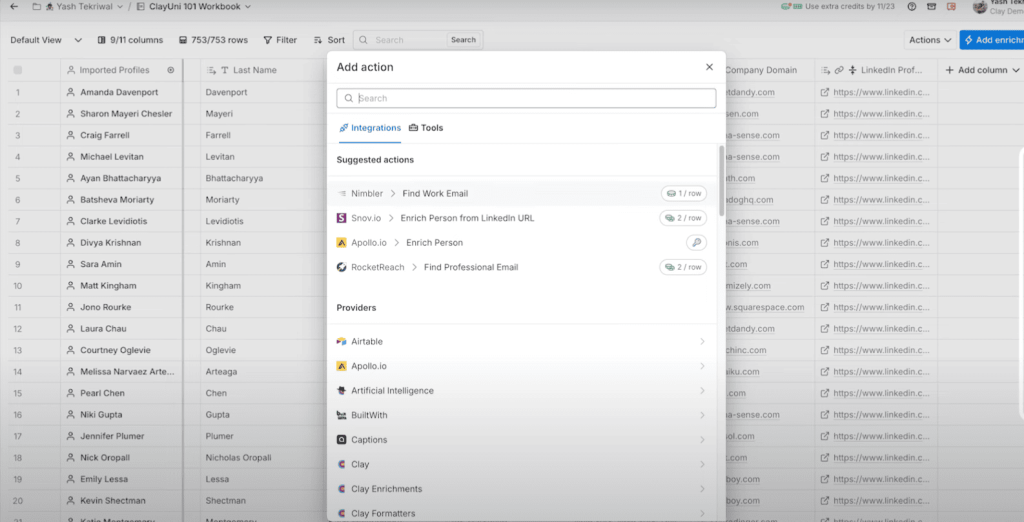
The waterfall enrichment model checks multiple data sources one after another instead of relying on just one provider. When Clay looks for someone’s email, it doesn’t rely on just one source. If the first source doesn’t have it, Clay automatically checks the next one and keeps going until it finds the email or runs out of options.
This matters because different data providers are good at different things. One vendor might have excellent coverage for enterprise contacts but weak data on startups. Another specializes in European companies but struggles with APAC. A third focuses on technical roles but misses finance and HR contacts.
Now your team doesn’t waste time checking five different tools to find one email address or data type. Clay runs that waterfall automatically in seconds, then moves to the next contact.
Clayagent
Most data tools give you basics like job titles and company size. Claygent goes deeper by reading through websites, blog posts, and public content to find information that standard data providers don’t capture.
For example, if your product only integrates with Shopify, Claygent can check the prospect’s source code or help center to confirm if they are actually on Shopify before you waste time adding them to a campaign.
But its research capabilities go beyond simple verification checks. Dvin Malekian, founder of Warmlead.io, automated account research that typically takes sales teams all day into a 20-minute process:
- He used Clayagent to pull 5,000 recent hires from target companies. He then used it to classify each business as either B2B or B2C by analyzing the entire website content, from scanning pricing pages, feature lists, to customer stories.
- Then Claygent visited BuiltWith pages for each domain and identified whether companies used HubSpot or Salesforce as their CRM. Finally, it scanned websites for success stories and case studies, extracting actual client names that reps could reference in their outreach.
- The result was a personalized prospect list where every account had been researched, qualified, and enriched with talking points, all without a single manual Google search.
It can also track technology changes, so when a prospect uninstalls a competitor’s product, that’s a signal they are about to switch to an alternative. Or it can detect when a company announces a major initiative like achieving SOC2 compliance or expanding to new markets.
Clayagent can also run social listening. Cursor, for example, uses Clay to monitor social platforms like X (Twitter), LinkedIn, YouTube, and Reddit to spot relevant signals and identify new prospects based on what people are saying online.





![The Ultimate Email Deliverability Toolset for 2026 [15+ Tools]](https://test.reply.io/wp-content/uploads/deliverability-300x158.jpg "The Ultimate Email Deliverability Toolset for 2026 [15+ Tools]")