Reply.io features: 2026 review
Reply.io’s real power is in how all the pieces connect: Reply Data for lead discovery, sequences for multichannel outreach, AI for personalization, email setup and deliverability tools to protect your domain, and analytics to keep improving the system over time.
Now, let’s go over the main Reply.io features in more detail.
Reply Data: 1+ billion live B2B contacts
Reply Data is the platform’s built-in B2B database, and it’s one of the biggest reasons many teams pick Reply.io over other outreach tools.
Instead of operating on static lists, you get access to a large, constantly updated dataset with 1+ billion contacts and around 60M+ accounts across 150+ countries, including hundreds of millions of contacts in the US alone.
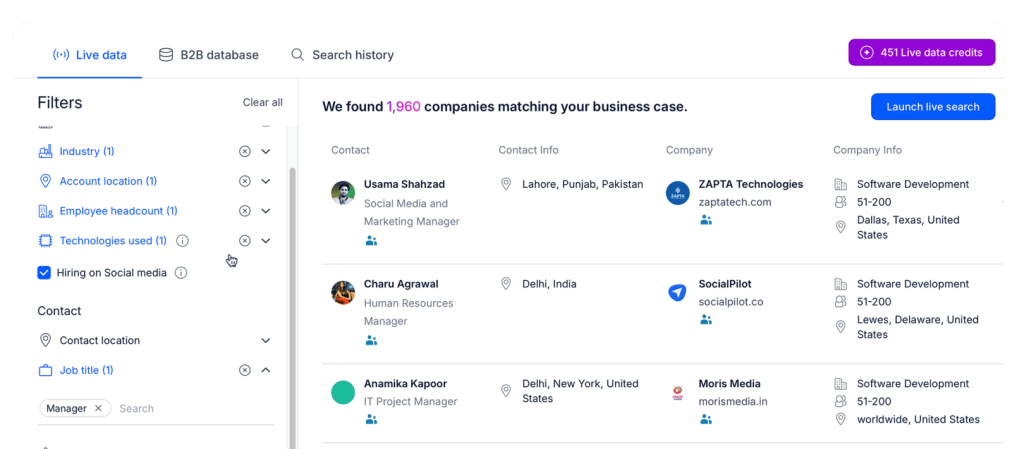
In practice, this means you define your ICP once, and then keep pulling fresh lists that match it:
- Build tightly targeted prospect lists using filters like location, industry, headcount, tech stack, department, role, seniority, and more.
- See both contact-level details (emails, titles, LinkedIn profiles) and company-level data (size, industry, high-level info) in one place.
- Preview and validate search results before you spend credits or drop contacts into sequences, so quality and costs stay under control.
The important bit here is that Reply leans heavily on live search and updated data, not just static data that changes over time. Combined with built-in email verification, Reply Data is solid enough to act as your primary lead generation source, not just a backup.
On top of that, you get solid contact enrichment. If a lead comes from your CRM or another source but is missing key pieces (role, LinkedIn URL, company size, etc.), Reply.io will enrich the record so you have enough context for AI-powered personalization to work properly.
To support that workflow, Reply also ships Findy, its native LinkedIn email finder extension. You can grab verified emails directly while browsing LinkedIn or Sales Navigator, and push those profiles straight into your active Reply.io sequences.
Net result: you go from “we’ve defined our ICP” to “we’re actively sourcing entire lists of verified, targeted leads” without ever leaving the product.
Multichannel outreach
Reply.io is positioned as a multichannel sales engagement platform, and multichannel sequences are at the core of that. Inside the sequence builder, you can combine:
- Email steps for initial outreach and follow-ups.
- LinkedIn actions like profile visits, connection requests, and DMs.
- Calls via the integrated dialer, plus tasks for manual touchpoints.
- SMS and WhatsApp steps where those channels make sense for your audience.
All of this sits inside one cadence, so prospects move through a defined journey instead of receiving random one-offs.
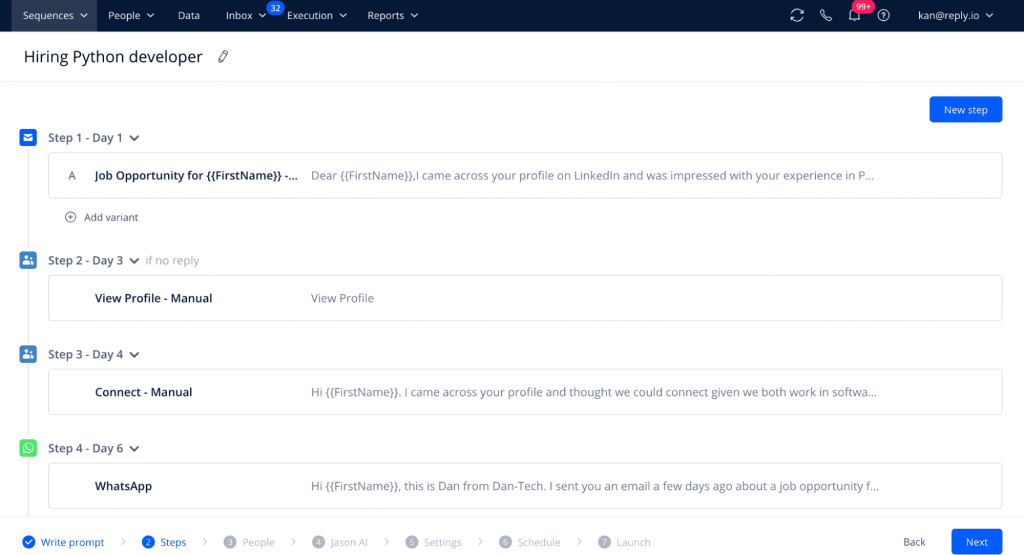
You can build custom sequences yourself or just let AI handle it. Either you set channels, steps, delays, and conditions manually, or you ask the AI assistant to suggest a structure based on a goal such as “book demos with Series A SaaS founders” or “re-activate closed-lost accounts.”
A key capability here is conditional logic. Reply’s AI will monitor each sequence and each lead in your pipeline in real time, and make the necessary changes based on their online behavior.
This way, sequences stay agile, and Reply.io ensures that each lead gets contacted with the right channel, with the right message, at the right time:
- Email opened, but no reply? Move them to a softer nurture branch and send an automated LinkedIn connection request.
- Clicked a pricing link? Switch them into a shorter, more direct sequence with a “book time” CTA.
- Accept your LinkedIn request? Kick off a LinkedIn-first conversation instead of another email.
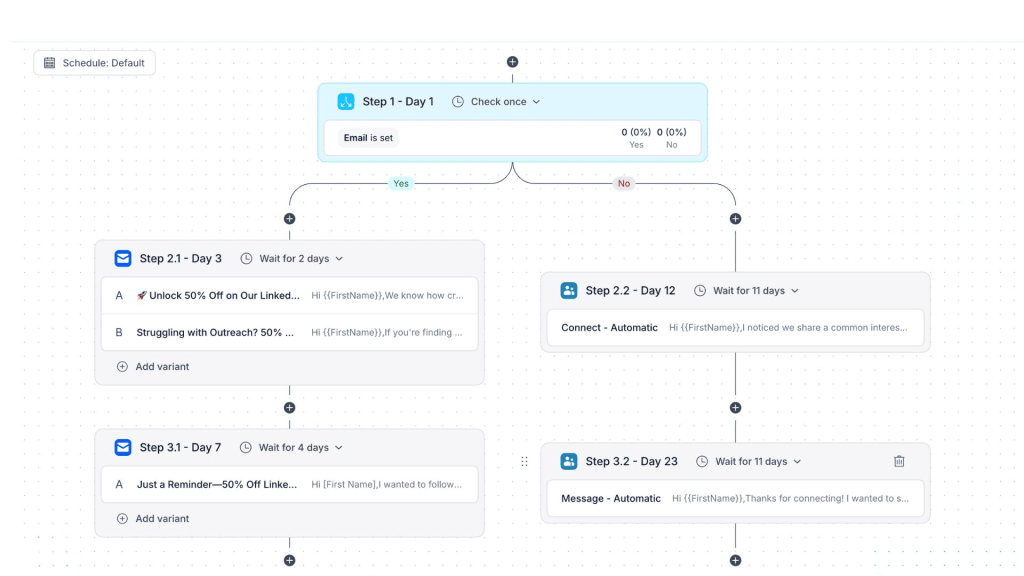
Timing is also under your control. You can set send windows, delays between steps, all while Reply handles time zone rules to ensure your outreach doesn’t show up at 3am local time and bother your prospects.
To keep messaging sharp, Reply.io supports A/B tests on emails and, in some cases, LinkedIn messages. You can test subject lines, hooks, CTAs, and use the data to standardize what actually works.
In 2026, single-channel outreach just doesn’t cut it at scale. Buyers drift between channels, and you often need several touches before they respond, so being able to coordinate email, LinkedIn, calls, and SMS in one system is a big reason why so many teams use Reply.io.
AI personalization
Another one of Reply.io’s main features is its AI personalization engine, which makes sure that every email, follow-up, and LinkedIn message is highly relevant, even when you start scaling to thousands of prospects.
The workflow usually looks like this:
- You identify and segment leads via Reply Data or by importing data from your CRM and other tools.
- You design a multichannel sequence as outlined in the step below (channels, tasks, timing, outreach purpose, etc.).
- You let AI adapt each touch to each prospect based on the available context.
Reply.io can mix structured data (title, company size, industry) with unstructured signals (LinkedIn profile info, website content, public news) to enrich each profile and then generate:
- Personal subject lines and hyper-personalized opening sentences, for instance, referencing their latest LinkedIn post about a recent promotion.
- Value propositions that are tailored to the prospect’s exact role, industry, and stage in their buyer journey.
- Follow-ups that reflect what already happened: opens, clicks, site visits, or previous responses (where tracking is in place).
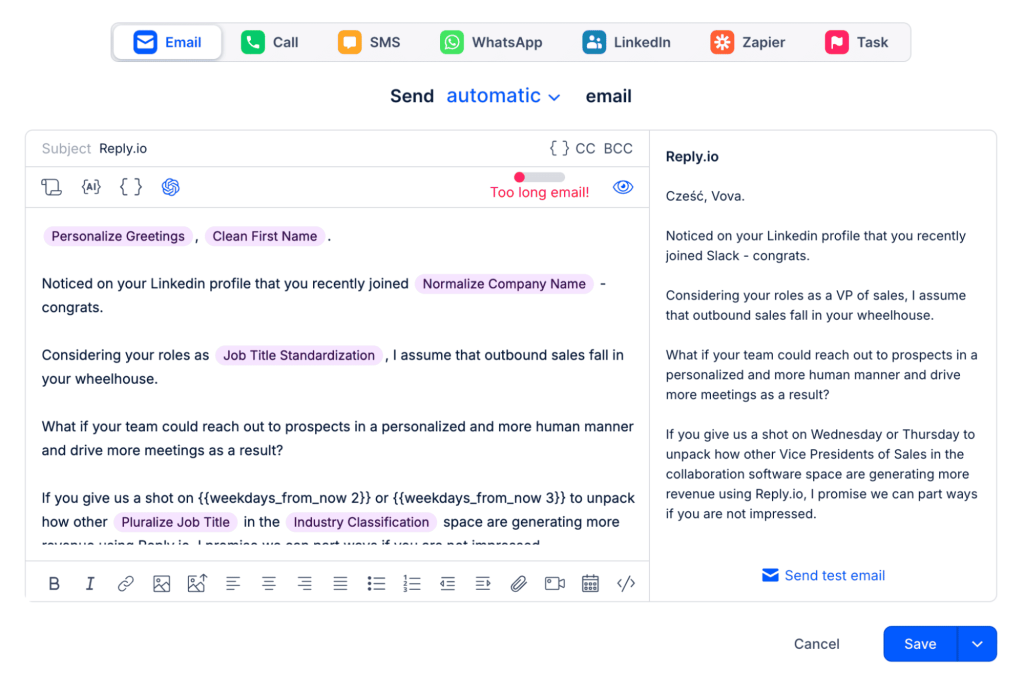 One of the more practical pieces here is the AI Variables feature. Instead of writing a custom opener for each person or using a generic template, you drop in an AI variable that auto-generates a relevant intro, value prop, CTA, or closing line for each contact based on their profile and available online data. Think of it as AI doing your research and first-line writing in the background.
Reply.io also tracks intent signals and context changes in real time, so if a prospect switches jobs or something meaningful happens at the target company, Reply will bring that up in your outreach.
A simple example: congratulating a buyer on their new role and then positioning your offer as something that helps them win early in that position.
When you put it all together, you get outreach that keeps the feel of a researched, hand-written message, while operating at a volume that would never be realistic manually.




![The Ultimate Email Deliverability Toolset for 2026 [15+ Tools]](https://test.reply.io/wp-content/uploads/deliverability-300x158.jpg "The Ultimate Email Deliverability Toolset for 2026 [15+ Tools]")